
Blueprints
How to use and create reusable data templates in Darwin
Blueprints
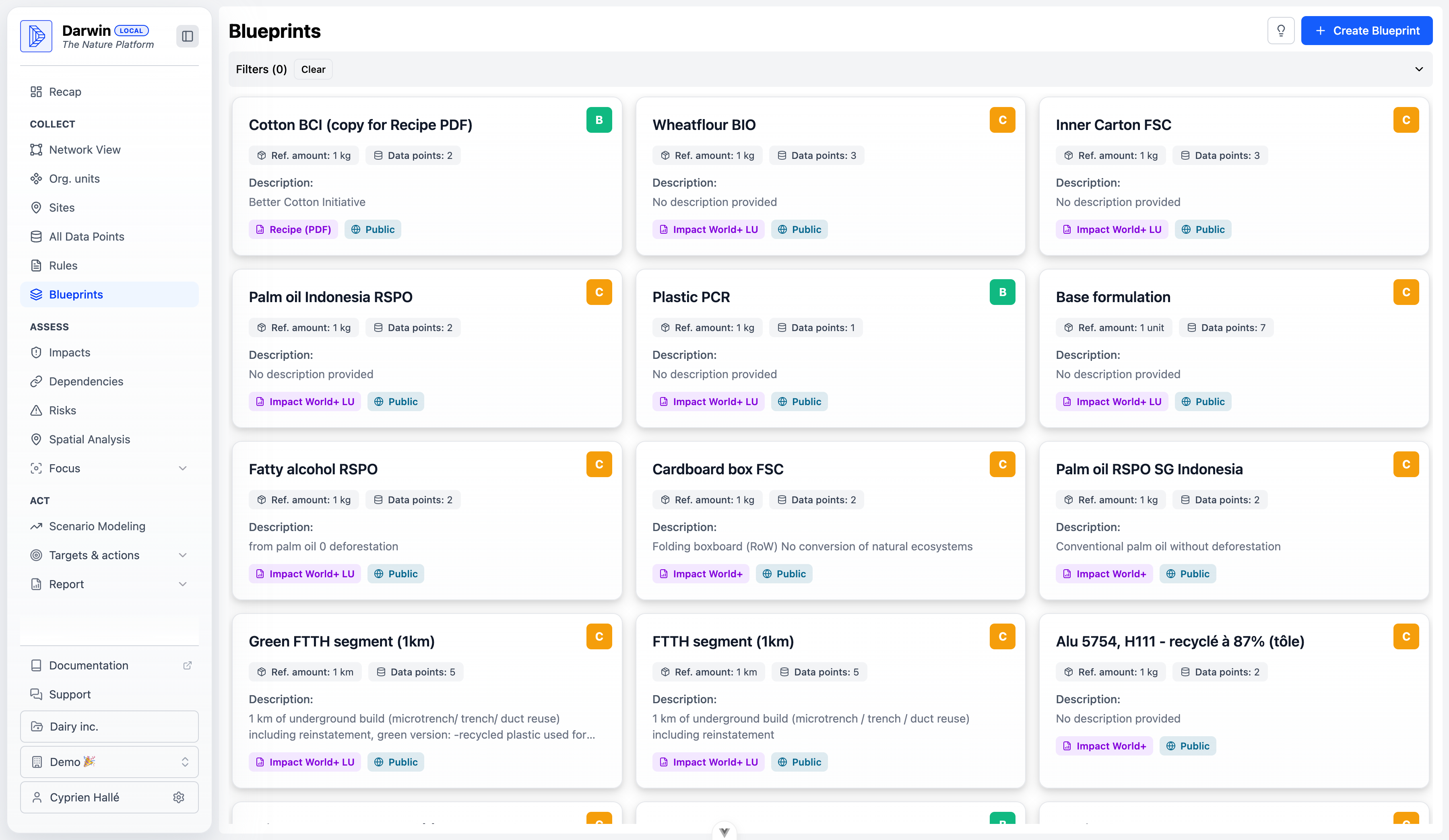
Blueprints are reusable templates that define the environmental footprint of common products, materials, or processes. They accelerate data entry by providing pre-configured data points based on industry standards and best practices.
What is a Blueprint?
A Blueprint contains:
- Reference amount: Base quantity (e.g., 1 kg, 1 unit)
- Data points: Pre-configured environmental inputs
- Impact model: Which model to use for calculations
- Quality score: Data quality rating (A-D or B-C)
- Visibility: Who can access this Blueprint
Using Blueprints
Access the Blueprints Library
Navigate to Collect > Blueprints in the sidebar.
Browse Available Blueprints
Use filters to find relevant Blueprints:
- Search: Type keywords like "palm oil" or "cotton"
- Impact Model: Filter by ReCiPe, Impact World+, GLOBIO
- Visibility: Public, Shared, or Private
View Blueprint Details
Click a Blueprint card to see:
- Description and methodology notes
- Included data points
- Data sources and assumptions
Apply to Your Data
From the Blueprint detail view:
- Click Use Blueprint
- Select the target entity
- Enter your quantity
- Darwin scales the data points automatically
Blueprint Quality Scores
| Score | Meaning | Data Sources |
|---|---|---|
| A | Excellent | Primary data, verified measurements |
| B | Good | Industry averages, peer-reviewed studies |
| C | Acceptable | Estimates, proxy data, assumptions |
| D | Low | Placeholder, needs improvement |
Prefer Blueprints with higher quality scores. The score affects your overall assessment data quality.
Blueprint Examples
Cotton BCI (Better Cotton Initiative)
- Reference: 1 kg of cotton
- Data points: Land use, water consumption, pesticide use
- Model: Impact World+
- Quality: B (industry-certified data)
Palm Oil RSPO SG
- Reference: 1 kg of palm oil
- Data points: Land use (no deforestation), transport
- Model: Impact World+
- Quality: C (RSPO certification assumptions)
Cardboard Box FSC
- Reference: 1 kg of cardboard
- Data points: Fiber sourcing, manufacturing
- Model: Impact World+
- Quality: C (FSC certification assumptions)
Create Your Own Blueprint
Click "Create Blueprint"
From the Blueprints page, click Create Blueprint.
Define Basic Information
Enter:
- Name: Descriptive title
- Description: Methodology notes and assumptions
- Reference amount: Base quantity and unit
- Impact model: Select the model to use
Add Data Points
For each environmental input:
- Click Add Data Point
- Enter label, value, and unit
- Match to an ecoinvent/EXIOBASE process
- Set contribution rules
Set Quality Score
Assess your data quality:
- Primary measurements → A or B
- Industry averages → B or C
- Estimates → C or D
Choose Visibility
| Visibility | Who Can Use |
|---|---|
| Private | Only you |
| Shared | Your organization |
| Public | All Darwin users |
Save Blueprint
Click Save to add the Blueprint to the library.
Blueprint Best Practices
- Document Assumptions: Include notes about data sources and limitations
- Use Standard Units: Stick to kg, m², kWh for consistency
- Reference Sources: Link to studies, certifications, or methodologies
- Version Control: Update Blueprints when better data becomes available
- Test First: Apply to a test project before wide deployment
Editing Blueprints
To modify an existing Blueprint:
- Open the Blueprint detail view
- Click Edit (only available for your Blueprints)
- Make changes
- Save the updated version
Editing a Blueprint does not automatically update projects that have already used it. You'll need to re-apply the Blueprint or manually update data points.
Archiving Blueprints
To remove a Blueprint from the active library:
- Open the Blueprint detail view
- Click Archive
- Confirm the action
Archived Blueprints can be restored later from the archive view.
Public Blueprint Library
Darwin maintains a library of public Blueprints covering:
- Agricultural commodities: Palm oil, soy, cotton, cocoa
- Packaging materials: Cardboard, plastic, glass
- Industrial materials: Steel, aluminum, cement
- Energy sources: Grid electricity by region
- Transport: Road, sea, air freight
Can't find what you need? Contact Darwin support to request new public Blueprints or contribute your own.