

Result Combination
How Darwin combines results across entities: avoiding double accounting and data propagation.
Result combination
Avoiding double accounting
- All results are computed at entity and Scope level.
- At entity and Scope level, input points can have three types of contribution (contribution status):
- "Add": all the results (commodities if applicable, pressures and impacts) generated by the input point are simply added to others for the given entity and Scope. Additional contribution is available for the 4 types of input points.
- "Replace": the results generated by the input point override other input points results. Override contribution is only available for commodity and pressure input data.
- For pressure type input points, all similar pressure and associated impact indicators are overridden at entity and Scope level.
- For commodity type input points, user has to specify if it overrides all the commodities, or all the commodities belonging to the same group 1 or group 2 commodity category or this particular commodity only.
- "Upgrade": the results generated by the input point only improves the quality of the total results for the given entity and Scope. Total results values remain the same. Upgrade contribution is available all input point types except monetary.
Contribution status availability per input point type summary table
| Input point type / contribution status | Additional | Override | Upgrade |
|---|---|---|---|
| Monetary | Available | Not available | Not available |
| Product | Available | Not available | Available |
| Commodity | Available | 4 perimeter options: single, group 1, group 2, all | Available |
| Pressure | Available | Available | Available |
Data propagation between entities
- Data is automatically propagated within the entities when possible.
- Data cannot be automatically propagated when:
- one entity has 2 or more parents, then an allocation split needs to be defined:
- Example: C4 (commodity) cannot be propagated as an allocation ratio is needed to do the split between Yogurt Branch and Ice Cream Branch.
- collected data at parent / Scope level is or generates similar data than the data to be propagated.
- Example: "W" (water withdrawal/ Scope 1) can not be propagated from Yogurt branch to Dairy Inc. as "EUR" (monetary) generates water withdrawal Scope 1 results.
- one entity has 2 or more parents, then an allocation split needs to be defined:
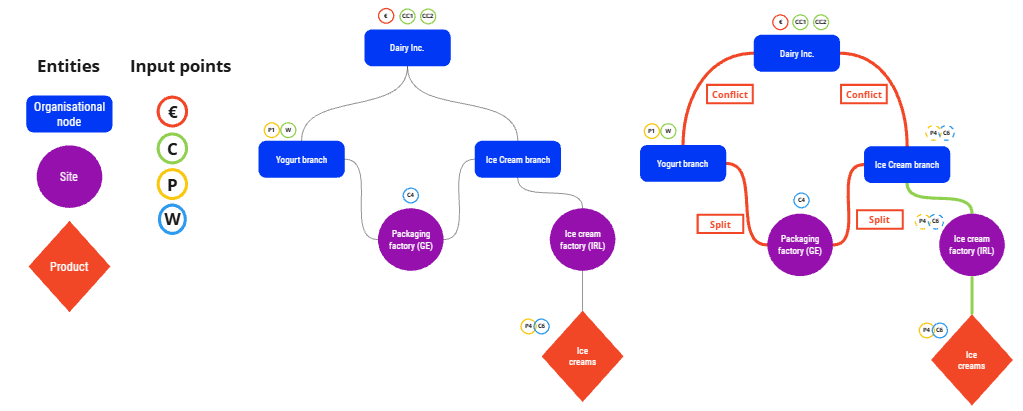
- Users can solve the conflicts by:
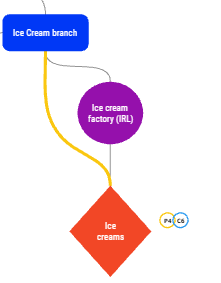
- defining an allocation ratio or deleting an over-specified link between for multiple parents. When allocation ratio is set to 0, it often means that the link between entities is indirect and can be deleted.
- Example: In that case a direct link between Ice creams (product type entity) and Ice Cream branch (organisational node entity) is not necessary as they are already indirectly linked by Ice cream factory (IRL) (site entity). Over-specifying links leads to unneeded actions (here an allocation ratio to be specified for "P4" and "C6") and makes data propagation more complex and time consuming.
- defining an allocation ratio or deleting an over-specified link between for multiple parents. When allocation ratio is set to 0, it often means that the link between entities is indirect and can be deleted.
- specifying the contribution type of the propagated data within the parent entity between additional, override and upgrade.
- Users can also decide to extrapolate data from one entity to another by applying a ratio to the value of the propagated data.
Was this page helpful?